
FaceTool: AI Face Swap Videos
SuTVPhotography
3.89.00 Reviews
- Version
- 1.1.81
- Installs
- 10.00K
- Age Rating
- Everyone
Screenshots
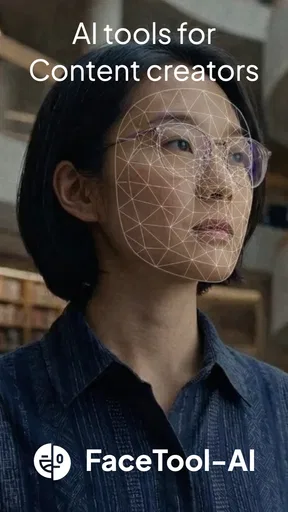
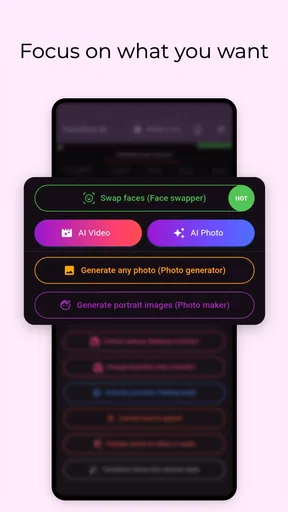
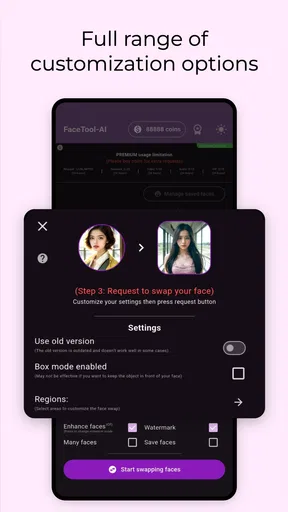
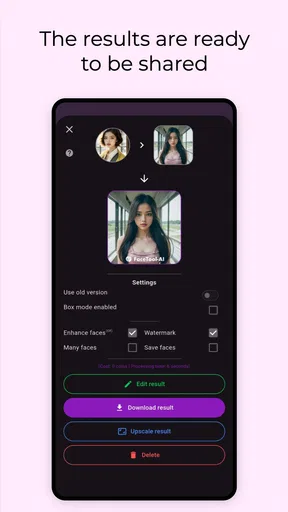
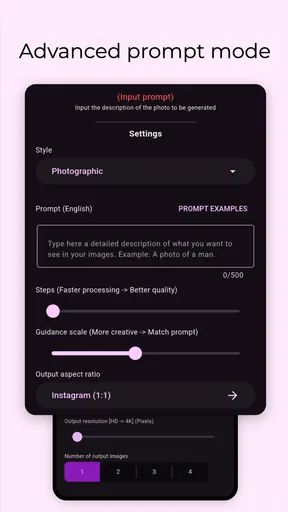
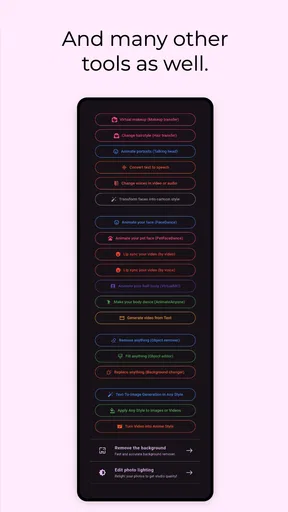
Our Review of FaceTool: AI Face Swap Videos
 Analysis by Appyee
FaceTool: AI Face Swap Videos is the kind of photography app I open when a normal portrait feels too ordinary and I want to turn it into something playful. Its focus is not traditional editing with careful sliders and layers. Instead, it uses artificial intelligence for face swaps in videos and photos, portrait creation, lip-sync effects, and voice-cloning experiments. My overall view is positive but selective: it is entertaining and approachable for quick social content, yet it is not a replacement for a full photo editor or a serious video-production tool.
What makes the app interesting is the way several novelty features sit together in one place. I can start with a still image, try a different face, move into a short video idea, or experiment with a talking portrait. That variety gives it more replay value than a single-purpose face-swap tool. At the same time, the broad feature set means the experience is best judged as a creative playground rather than a precision instrument.
What using FaceTool feels like in practice
FaceTool is a free photography app from SuTV, with optional purchases ranging from $1.99 to $64.99 per item. It is available for users aged Everyone and works on Android starting with version 7.0. The current release is 1.1.81, and the app has passed 10K installs. Those details place it within reach of a wide range of Android phones, although compatibility on paper does not guarantee that every device will process demanding video effects equally smoothly.
The first thing I noticed is that the app is designed around immediate results. Rather than asking me to learn a complicated editing workflow, it encourages me to choose a photo or video and see what the automated effect can produce. That is a good fit for someone who wants a funny clip for a group chat, a stylized portrait for a profile, or a quick experiment without spending an evening learning professional software.
The face-swap idea works best when the source material is clear and the face is easy to identify. A front-facing portrait with reasonable lighting gives the system a much better starting point than a dark image, a face hidden by hair, or a moving subject turned sharply away from the camera. This is not a glamorous tip, but it makes a noticeable difference: choosing the right source image usually matters more than repeatedly trying to fix a poor one.
I also found that restraint improves the result. A subtle swap can look amusing because the surrounding image still feels believable. An extreme mismatch in angle, expression, or lighting is more likely to reveal the effect. For that reason, I would prepare several candidate photos before starting rather than committing to the first image in the gallery.
Where the creative tools are strongest
The app’s strongest quality is convenience. Face swaps in videos are usually more demanding than replacing a face in a still image because expressions, head movement, and changing light all have to remain coherent. FaceTool makes that kind of experiment accessible to people who would not normally touch timeline-based editing software. I would use it for a short joke, a themed greeting, or a playful transformation where a little artificiality is part of the fun.
The portrait tools are useful in a different way. They encourage experimentation with identity and style without requiring a photo shoot or a collection of editing presets. If I wanted several imaginative profile images, I could use the same starting portrait and compare different results. The practical advantage is speed, but the trade-off is that the output depends heavily on the source image and on how convincingly the generated style preserves the person’s recognizable features.
Lip-sync effects add another layer of entertainment. A still face that appears to speak can work well for a short personal message or a deliberately silly clip. I would not approach it as a substitute for recording a real performance, because the charm comes from the artificial effect itself. The best use is usually brief and clearly playful, especially when the viewer understands that the image has been transformed.
Voice cloning is the feature that deserves the most thoughtful handling. It can make a creative project feel more personal, but a recognizable voice is sensitive material. I would only use my own voice or one belonging to someone who has clearly agreed, and I would label the result when another person could mistake it for a genuine recording. The app makes experimentation easy; that does not remove the responsibility to avoid impersonation, misleading edits, or embarrassing someone without permission.
Small workflow decisions that improve results
One useful workflow is to separate the creative stages instead of trying to do everything at once. I would first choose a clean portrait, then test the face transformation on a still image, and only after that move to a video or lip-sync effect. This helps identify whether the face itself is producing a convincing result before extra motion and audio make the outcome harder to judge.
Another practical approach is to keep the intended destination in mind. A quick clip for a private message can tolerate a rougher edge than an image I plan to use publicly. If the result is meant for a profile picture, I would inspect the eyes, mouth, hairline, and skin boundaries at full size before sharing it. Automated edits can look fine in a small preview while appearing less natural when enlarged.
I would also keep the original image untouched and treat every generated version as a separate experiment. That makes it easier to compare different source photos and prevents an unsuccessful effect from replacing the picture I actually wanted to keep. This sounds obvious, but it is especially useful when testing several transformations in a row.
A final tip is to use the app for ideas rather than expecting the first result to be final. The most enjoyable sessions come from comparing variations: a serious portrait against a humorous one, a natural expression against an exaggerated expression, or a still image against a short moving scene. That trial-and-comparison approach turns the app from a one-tap novelty into a small creative process.
The important limitations
The main weakness is consistency. Artificial face editing can be impressive in one image and awkward in the next, especially when the face is partly covered, the subject is in profile, or the video contains fast movement. I would not promise a polished result to someone who needs dependable output for a client, a business account, or an important announcement.
Video work also brings practical friction. Processing moving images is more demanding than editing a single photo, so patience may be necessary on less powerful phones. Longer or visually complicated clips are not the ideal place to begin. A short, simple source gives the app fewer problems to solve and makes it easier to decide whether the effect is worth keeping.
The free entry point is attractive, but the presence of in-app purchases means the complete experience may involve spending for selected items or functions. I would check the purchase prompt carefully before confirming anything, particularly if I were testing the app casually. The broad purchase range makes it sensible to try the free side first and decide whether the results justify paying for more.
The app’s average rating is 3.8 from around 257 ratings, with about 9 written reviews. I read that as a sign of a mixed but reasonably interested audience rather than universal approval. That matches my own assessment: the concept is appealing, but automated results naturally vary, and people expecting professional-level control may be disappointed.
There is also a creative limitation compared with ordinary alternatives. A conventional photo editor gives me direct control over cropping, color, exposure, masking, retouching, and composition. A standard video editor gives me more predictable control over cuts, sound, timing, and transitions. FaceTool is better when the central idea is an AI transformation; the usual alternatives are better when I already know exactly how I want the finished image or video to look.
Who should use it and who should skip it
I would recommend FaceTool to curious Android users who enjoy experimenting with photos and short videos, especially people who want social content without learning a professional editing suite. It suits casual creators, friends making humorous birthday clips, and anyone interested in seeing how a portrait changes when the face, voice, or lip movement becomes the main effect.
It is also a good option for someone who values variety more than exact control. Having face swaps, portraits, lip sync, and voice-related experiments in one photography app makes it easy to move from one idea to another. The app is most rewarding when the goal is discovery: try something, compare the result, laugh at the imperfect version, and keep the one that works.
I would steer away from it if the job requires accurate retouching, careful brand presentation, or repeatable professional results. A photographer preparing a final client image would be better served by a dedicated editor. A video creator needing precise timing and audio mixing would probably prefer a full video application. Someone uncomfortable with synthetic faces or cloned voices should also skip those parts and use only the simpler portrait experiments, if any.
For families and younger users, the Everyone rating makes the app broadly accessible, but accessibility is not the same as judgment-free use. I would explain that edited faces and voices can mislead people, and I would avoid uploading another person’s likeness without permission. Used openly as a joke or creative effect, the tools are more enjoyable and less likely to cause confusion.
A realistic everyday scenario
Imagine I want to send a birthday message to a friend but do not want to record a conventional selfie video. I could choose a clear portrait, test a face transformation, and then create a short lip-sync clip with a playful message. If the first version looks strange around the mouth, I would switch to a better-lit photo rather than trying to force the same source through more effects. I would send the finished result privately and make it clear that the voice or movement is synthetic.
That scenario shows both the appeal and the boundary of FaceTool. It can turn a simple idea into something memorable in a few creative steps. It is not designed to replace a real conversation, produce a documentary-style performance, or guarantee that every facial movement looks natural. Its value is in making a small moment more amusing, not in hiding the fact that technology helped create it.
My final verdict
FaceTool is worth trying if you want quick, playful AI photography rather than exact editing control. Its combination of video and photo face swaps, portrait creation, lip-sync effects, and voice-cloning experiments gives it a clear personality. I like that it lowers the barrier to creative experimentation, and I can see myself returning to it when I need an unusual idea for a short message or social post.
Still, I would approach it with realistic expectations. Source quality matters, video results can vary, and the optional purchases deserve attention before spending. The app also works best when its artificial look is part of the joke or concept. If I needed dependable professional polish, I would choose a traditional photo or video editor instead.
For casual creators, the free starting point and broad creative focus make it an appealing download. For perfectionists, professionals, or anyone seeking full manual control, it is probably the wrong tool. My recommendation is to begin with a well-lit portrait, test a short project, review the result closely, and use the more sensitive voice and face features only with clear consent. Used that way, FaceTool: AI Face Swap Videos is an entertaining creative companion rather than an all-purpose editing solution.
Verdict
Strengths of FaceTool: AI Face Swap Videos
- Creates entertaining face-swap videos with minimal editing effort.
- AI processing handles facial alignment automatically in most clips.
- Useful templates make it easy to try different video effects.
- Supports quick sharing of finished creations on social platforms.
- Can provide a fun way to experiment with personalized content.
Limitations of FaceTool: AI Face Swap Videos
- Results may look unnatural with side profiles or poor lighting.
- Some features or exports may require a paid subscription.
- Processing can take longer for high-resolution or lengthy videos.
- Uploading face images raises privacy and data-handling concerns.
- Frequent use may consume considerable storage and mobile data.
Other Releases by SuTV
View All
FaceTool: Face Swap & Generate
Photography4.3
Similar Picks in This Category
View All
Google Photos
Google LLC4.4

Gallery
Google LLC4.2

Picsart AI Photo Editor, Video
PicsArt, Inc.3.9

B612 AI Photo&Video Editor
SNOW Corporation4.1

BeautyPlus-Selfie Photo Editor
PIXOCIAL TECHNOLOGY (SINGAPORE) PTE. LTD.4.5

Remini - AI Photo Enhancer
Bending Spoons4.1
Frequently Asked Questions
What is FaceTool: AI Face Swap Videos and how does it work?
FaceTool: AI Face Swap Videos is an entertainment app that uses artificial intelligence to place a selected face into photos or video clips. After choosing a template or importing compatible media, you normally upload a clear selfie and let the app process the swap. Results can vary depending on lighting, facial angle, image quality, and the complexity of the scene.
Is FaceTool: AI Face Swap Videos free to download and use?
The app may be available to download at no initial cost, but some templates, processing options, exports, or advanced features can require in-app purchases or a subscription. Before confirming payment, check the current pricing, trial conditions, renewal terms, and whether downloaded results include restrictions such as watermarks. Availability and costs may differ between Android and iOS.
What permissions and personal data does FaceTool require?
FaceTool generally needs access to photos or files so you can select selfies and videos, and it may require camera access if you choose to capture an image inside the app. Because face-swapping involves biometric-looking images, review the privacy policy and app-store data-safety information carefully. Avoid uploading sensitive photos, and remove access through your device settings when you no longer need it.
Can FaceTool create realistic face-swap videos, and what affects the result?
The app can produce entertaining face-swap videos, but the output is not guaranteed to look perfectly realistic every time. A front-facing, well-lit selfie with a neutral expression usually works best. Results may be less accurate when the source face is partly covered, turned sideways, low resolution, heavily edited, or affected by fast movement, unusual lighting, or multiple people in the same frame.
Are there safety or copyright concerns when using FaceTool videos?
You should only use faces, photos, and videos that you own or have permission to edit, especially when creating content featuring friends, celebrities, or public figures. Do not use face swaps to impersonate someone, spread misleading material, or create harmful or non-consensual content. Also check the rights attached to templates and music before sharing results publicly on social networks or commercial platforms.
